Handling Missing Post Thumbnails in Your Theme
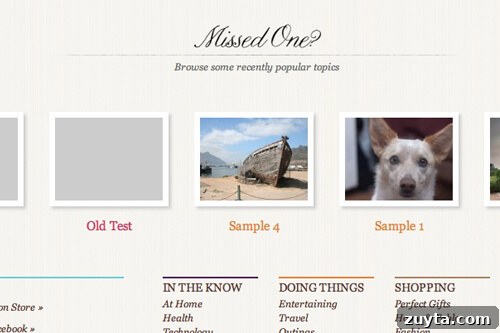
When building a theme that relies on post thumbnails of specific dimensions, missing images can break layout and harm the user experience. If a client forgets to attach a featured image or a post lacks one, the layout should remain intact and visually consistent. A small utility that generates a placeholder image of the required size solves this problem and keeps the theme resilient.
What the placeholder function does
The utility function, named be_no_thumbnail($size), generates a blank placeholder image in the requested dimensions. You call the function with the desired size identifier and it returns an image that fits the space your theme expects. This allows templates to assume an image will always be present and prevents layout shifts when thumbnails are missing.
Integration with WordPress image sizes
This approach is designed to work with the standard image sizes configured in WordPress under Settings > Media: thumbnail, medium, large, and full. When you pass one of these size names to the function, it uses the corresponding dimensions so the placeholder matches the theme’s expected width and height.
If your theme registers custom image sizes using add_image_size(), those dimensions are not stored in the same database fields as the default sizes. For custom sizes, you will need to adapt the function or retrieve the custom size dimensions differently so the placeholder matches the custom size exactly.
Typical usage
Use the placeholder function wherever the theme would normally output a post thumbnail. In a template loop, check for the presence of a featured image and fall back to the placeholder when none exists. For example, if your layout expects an image of the “medium” size, call the utility with that size identifier to return the appropriate blank image.
Because the function returns an image sized to match the image settings, it integrates smoothly with responsive layouts and CSS rules that depend on consistent image dimensions. Using a server-generated placeholder avoids layout reflow and ensures consistent spacing, alignment, and aspect ratio across posts whether they have real thumbnails or not.
Benefits
- Prevents broken layouts when featured images are missing.
- Maintains consistent appearance across posts and archive pages.
- Is easy to call from within templates and theme functions.
- Works with built-in image size settings for predictable output.
Notes and caveats
Because default WordPress image sizes are stored in the Settings panel, using those size names with the function yields predictable results. For custom image sizes, you must ensure the placeholder function knows the exact pixel dimensions to reproduce the same visual result.
Also consider accessibility: when substituting a placeholder for a missing featured image, provide appropriate alt text or aria attributes to convey the absence of a real image to assistive technologies. This maintains a better experience for users relying on screen readers.
Summary
In short, be_no_thumbnail($size) provides a simple, theme-friendly solution for missing post thumbnails. It preserves layout integrity, keeps the visual design consistent, and integrates with WordPress image settings. Adapt the function as needed for custom sizes and remember to account for accessibility when outputting placeholder images in templates.